How to Create a Website Template
First Timers
If this is your first website, I highly recommend that you run through our 9 Step Crash Course on Learning Basic HTML 👈
The tutorial is simple copy & paste.
Planning the Appearance
Grab a pencil and paper and start by making a diagram of your web template.
You will be building your template with a series of boxes called divisions.
Your brainstorming might go something like this.
Template Diagram
The template diagram shown below, proposes the use of 4 main divisions.
Note: Breaking up the web page into single row sections will make divisions easier to understand.
The top Heading Division (header element) is used to display sitename, logo and pertinent information if desired. Use text or a banner type image.
The second Navigation Division (nav element) will be used for a site navigation device.
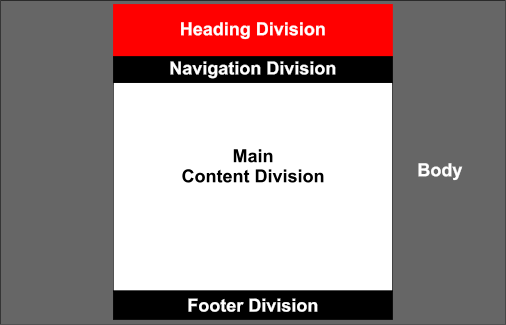 The third Main Division will display our content, images and videos we want to present.
The fourth Footer Division (footer element) will contain the sitename and copyright information.
The footer is an important part of a website template. Not only does it supply information to a user, but it can also contain information for bots, like a valid physical address of your company.
Place contact information in the footer and information about the age of the page for your viewers. When someone enters your site via a page other than the homepage, the footer could provide sufficient information about where they are and how to get to the main page.
The HTML5 Code for the Diagram
The HTML
<!DOCTYPE html>
<html lang="en">
<head>
<link rel="stylesheet" href="style.css" type="text/css">
</head>
<body>
<header>Optional</header>
<nav>Navigation Device</nav>
<main>Web Page Content</main>
<footer></footer>
</body>
</html>
The HTML code shown on the left could actually be used to create the web page layed out in the colored diagram.
The web page would be linked to a style sheet as shown.
This example is linked to style.css
The Style Sheet
The style sheet is where the actual design of our web page is defined.
You'll use your style sheet to define the width of each box element on the page, define the colors you want to use and even add background pictures and textures if desired.
Also included in your style sheet are the elements that produce responsive web design. These include Media Queries which can define how a web page looks when visited by the many different widths of viewing devices.
Color
🎨 If you have colored pencils or crayons, you might add the colors to the various sections that you want to use. You don't need to be exact. You're just getting a rough idea of the web page you want to build. Don't go crazy with color. Use 3 main colors or less.
See Choosing Colors
Sample Layouts
There are many different web page layouts which can be created using divisions and CSS.
Get a second opinion. Get other people to look at your final choice of the web page templates you have built. Ask them about their first impressions. If their impressions agree with yours, start cranking out those pages, IF you've done your RESEARCH..
👉Next Stop: Sample Web Page Layouts