
Create a Website Using HTML5
Step Into the Future with RWD
The future of web design is in Responsive Web Design
That simply means building one website that can be accessed with any device: desk top, cell phone and anything in between.
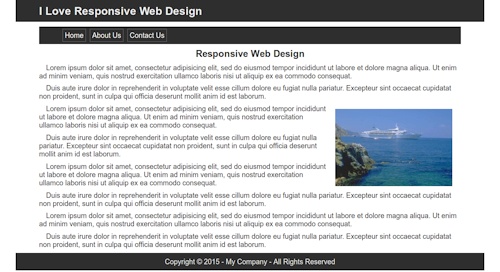
Get started right by spending a few minutes in our NEW Tutor that introduces you to the world of RWD.
You'll see how web pages are built by DOING just that.
Your finished page will be Mobile Ready with RWD features.
Or go ahead and start 10 years behind when you post your first web page built using STATIC Design!
Our Tutorial Process
Beginners will start with a simple approach to learning:
Seeing + Doing = Learning
You will SEE HTML5 code:
<html>

<body>

<p>Paragraph code</p>

</body>

</html>
You will copy it and paste it into a web page you created.
You will SEE CSS code:
p {

  font-family: arial, tahoma, serif;

  font-size: 16px

}
You will copy it and paste it into a style sheet you created.
Then you will learn to look at the HTML document with a browser and see how HTML and CSS work together.
Tutorial Overview
Beginners might need:(Provided in Tutorial)
- How to find and use Notepad
- Learning to Copy and Paste code (HTML & CSS)
- Learning to Create New folders on your computer
- How to Preview your web pages in a browser.
7 Step Tutorial (Using NotePad - Copy and Paste)
- Basic HTML Page Structure - Creating a Style Sheet(CSS) <---Start Here!!
- Styling the header & footer elements(HTML5) & division tag with CSS
- Add an H1 tag and style it using CSS
- Add Nav Element(HTML5) and Use an Unordered List to build a menu
- Add content using paragraph tag
- Add an image
- Build a drop down menu and make it Mobile Ready
Beginners are encouraged to work through the 7 Step tutorial several times.
You'll be surprised at how much of the information sinks in about the third time through just by copying and pasting.
Put It On the Web
Using Our Web Hosting!
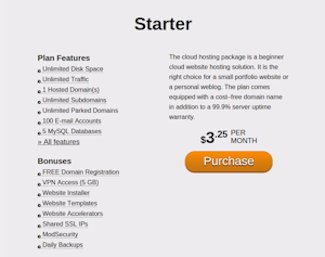
Why We Recommend cafwhosting
1..Because we've used it for over 20 years
2..We don't oversell our servers
3..We guarantee 30 minute or less tech response
4..We guarantee 99.9% uptime
Check Our Hosting First
Other Stuff You'll find on CaFW
You can increase your knowledge using the other HTML5/CSS tutorials on this website, including:
HTML tags/elements:
- header element
- h1 to h6 elements
- section element
- nav element
- footer element
- division tag
- anchor tag
- lists
- paragraph tag
- tables
- forms
Advanced Helps:
- Uploading your site
- Setting up a localhost
- Testing forms on a PC
- Use of liquid design
This site will teach you the fundamentals you need to create a website with HTML.
We focus on:
- Using as little HTML code as possible.
- Learning a lot of CSS
Free Tools We Recommend
- FREE HTML Editor: NoteTab Light
- All the features of a commercial HTML editor.
- FREE Photo Editor: PhotoScape
- Resize, optimize and enhance your website pictures.
- FREE Apache Server for Windows: IndigoAmpp
- Set up a real time server environment right on your PC. Test forms and scripts before uploading to your web space.
- Linux Users
- If like us, you've finally left the insane world of Microsoft Windows, we highly recommend the free BlueFish HTML editor. You'll find it in your software repository.
Planning Your Website
This HTML tutorial teaches the mechanical side of creating web pages.
Before you begin the actual construction of your website, you should visit our Website Design Tutor for information on Research and Planning your website. Includes information on page layout and the use of color.