
Line Break Tag HTML5
<br />
All attributes of the br tag are obsolete in HTML5.
The line break should only be used within text elements like the paragraph to break lines of text at desired locations.
In the past, lazy designers like myself used the br tag with the clear attribute for help in structuring web pages. Improper use, but it validated until HTML5 was released.
If you are converting to HTML5 and need a replacement to keep elements of your web page from running together, I've provided a simple fix below.
Break Clear all HTML5 Replacement
Using HTML4 to break your page elements at desired locations, you would simply place a br clear all tag and the page would line up as desired.
You can still use the tag to get the result in HTML5 but when you validate your code, you'll get errors every where you place a br tag with a clear attribute.
There are a couple of simple fixes.
Use this: <p class="clear"> </p>
CSS for the class:
p.clear {
	clear:both
}
To render this web page:
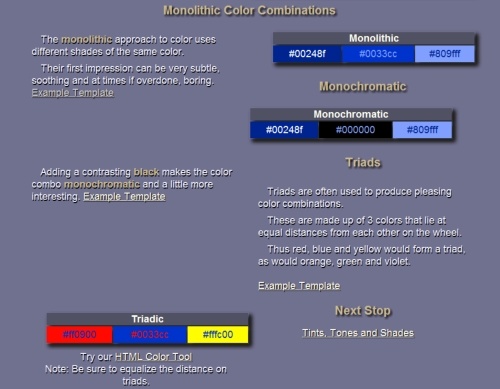
like this:
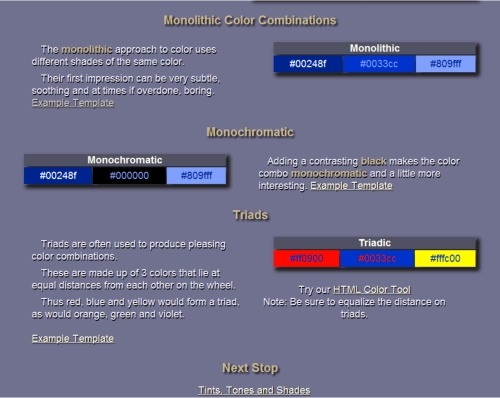
If W3C validation is important to you, here's an easy fix to keep your text from backing up into places you don't want it.
Place the <p class="clear"> </p> shown above before the H2 tags that produce the headings Monochromatic, Triads and Next Stop.
This will validate and it keeps the H2 tags from backing up to the available empty space.
Replacement for br tag used to create space.
Don't want your content laying on your footer?
Here's a little code for lazy designers to replace the br tags at the bottom of your web page content.
<p style="line-height: 200%"> </p>
You could also create a paragraph class like this:
<p class="spacer"> </p>
The CSS:
p.spacer {
line-height: 200% }