
Frames/iFrames Target
Frames Are Obsolete
Before You Proceed!
The frameset and frame tags are not supported in HTML5.
iframes - Target
The target attribute looks like this in code:
target="framename"
The diagram below shows the original layout of our iframe navigation system.
We did change to a 3 tier drop down to eliminate the toc frame.
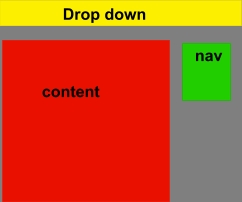
The yellow area is our drop down that is used to target our content pages into the 'ifrm' (content) iframe.
The green area was our nav iframe which contained links that targeted source pages into the red iframe.
The green navigation iframe was eliminated by adding a 3 tier drop down menu.
Target Pages into the Nav iframe (Original Design)
To do this we must:
- Give a name to nav iframe.
- Create a toc links pages that contain the links to target source pages into our content frame.
We give the nav iframe a name using the name attribute.
<iframe name="navigation"></iframe>
We add the links to our drop down menu that look like this:
<a href="toc-whatever.html" target="navigation">Whatever Category</a>
Target Source Pages into the Content iframe
To do this we must:
- Give the content iframe a name using the name attribute.
<iframe name="content"></iframe> - Create our toc-whatever.html web page and place links in it to target into our content iframe.
The code for the links in toc-whatever.html would look something like:
<a href="whatnot.html">What Not</a>
Scrolling
We don't want scrolling on our website. We want it to look like a conventional website.
That's why we added a free script that resizes the content iframe each time a new page is targeted in or the browser window is resized.
<script type="text/javascript">

function getDocHeight(doc) {

    doc = doc || document;

    // stackoverflow.com/questions/...

    var body = doc.body, html = doc.documentElement;

    var height = Math.max( body.scrollHeight, body.offsetHeight,

        html.clientHeight, html.scrollHeight, html.offsetHeight );

    return height;

}


function setIframeHeight(id) {

    var ifrm = document.getElementById(id);

    var doc = ifrm.contentDocument? ifrm.contentDocument:

        ifrm.contentWindow.document;

    ifrm.style.visibility = 'hidden';

    ifrm.style.height = "10px"; // reset to minimal height ...

    ifrm.style.height = getDocHeight( doc ) + "px";

    ifrm.style.visibility = 'visible';

}

</script>
I got this code free from: Dynamic Web Coding
Lot's of other great free scripts on their website.
iframe code that goes with it:
<iframe id="ifrm" name="content" src="index.html" onload="setIframeHeight(this.id)" scrolling="auto">

<p>Your browser does not support iframes!</p>

</iframe>
Note: You can change the name and the src page, but don't change the id.
Place the iframe code in the body of your webpage and the script in the head section. Works like a charm.
Why Don't We Want Scrolling
The iframe doesn't work like the old frameset and adjust to the height of the visiting browser.
You have to manually set the height of an iframe (height="100%" has no effect).
What would you set the height to?
Set it to 600px and it might work okay for some one viewing on an 800X600 monitor. Not so good for someone viewing with a 1280X1024 or 1920X1024.
If the iframe scrolls you have to double scroll to read everything that is on a long web page.
You'll scroll once on the iframe and then have to scroll again on the browser window to get to the bottom of the page.
We want our users to scroll just like they do on a conventional website using the browser scroll bar.